I am still here but doing most of my technical articles in the Intense School Website. Please visit the link below.
http://resources.intenseschool.com/author/peterson-amar/
Intense School Article - GNS3 Lab: Introduction to MPLS Layer 3 VPN Part 2
I have written an article for Intense School. Find the link below.
http://resources.intenseschool.com/gns3-lab-introduction-to-mpls-layer-3-vpn-part-2/
For great trainings and offerings from Intense School, click on the link below.
http://www.intenseschool.com/boot_camp/cisco/
http://resources.intenseschool.com/gns3-lab-introduction-to-mpls-layer-3-vpn-part-2/
For great trainings and offerings from Intense School, click on the link below.
http://www.intenseschool.com/boot_camp/cisco/
Intense School Article - GNS3 Lab: Introduction to MPLS Layer 3 VPN Part 1
I have written an article for Intense School. Find the link below.
http://resources.intenseschool.com/gns3-lab-introduction-to-mpls-layer-3-vpn-part-1/
For great trainings and offerings from Intense School, click on the link below.
http://www.intenseschool.com/boot_camp/cisco/
http://resources.intenseschool.com/gns3-lab-introduction-to-mpls-layer-3-vpn-part-1/
For great trainings and offerings from Intense School, click on the link below.
http://www.intenseschool.com/boot_camp/cisco/
Intense School CCNA Voice Article - Adding IP Phones to the CME
I have written an article regarding Adding IP Phones to the CME . Please find the link below and comment in the Intense School Website. Thanks!
http://resources.intenseschool.com/ccna-voice-prep-adding-ip-phones-to-the-cme/
http://resources.intenseschool.com/ccna-voice-prep-adding-ip-phones-to-the-cme/
Finally A CCIE!
Finally, I have completed my dream. Now it's time to change this site to be of more help to others who are pursuing their certification.
Intense School CCNA Voice Article - CME Installation and Administration
I have written an article regarding CME Installation and Administration. Please find the link below and comment. Thanks!
http://resources.intenseschool.com/ccna-voice-prep-cme-installation-and-administration/
For more information on studying for CCNA Voice, please click this link. http://www.intenseschool.com/boot_camp/cisco/ccnavoice
Intense School CCNA Voice Article #3
Intense School Article on Demystifying CCNA Voice Exam
I have written an article over at the Intense School resources website on CCNA Voice, "Cisco IP Phone Boot Process and Registration". Here is a link to the article.
http://resources.intenseschool.com/ccna-voice-prep-cisco-ip-phone-boot-process-and-registration/
For more information on studying for CCNA Voice, please click this link. http://www.intenseschool.com/boot_camp/cisco/ccnavoice
I have written an article over at the Intense School resources website on CCNA Voice, "Cisco IP Phone Boot Process and Registration". Here is a link to the article.
http://resources.intenseschool.com/ccna-voice-prep-cisco-ip-phone-boot-process-and-registration/
For more information on studying for CCNA Voice, please click this link. http://www.intenseschool.com/boot_camp/cisco/ccnavoice
Intense School Article on Demystifying CCNA Voice Exam
I have written an article over at the Intense School resources
website on CCNA Voice, specifically "Demystifying the CCNA Voice Exam". Here is a link to the
article. http://resources.intenseschool.com/demystify-ccna-voice-cert-exam/
For more information on studying for CCNA Voice, please click this link. http://www.
Intense School CCNA Voice Article 1
I have written an article over at the Intense School resources
website on CCNA Voice, specifically "Understanding the Pieces of Unified Communications". Here is a link to the
article. http://resources.intenseschool.com/demystifying-ccna-voice-understanding-the-pieces-of-cisco-unified-communications/
For more information on studying for CCNA Voice, please click this link." http://www.
Still Here and Doing Cisco Stuff
Its been a while since I last posted, I am currently studying for my 2nd attempt late this year. I promise to post again once I get my digits and there will be a lot of changes in this site. I thank you my friends for visiting this and I hope you continue to do so. See you again when I get my digits.
Video Blogs
I am quite busy with my studies now that I don't have time to blog. I am thinking of using Camtasia and instead do a Video blog, saves a lot of time and the explanation will be real time. I want to get active in posting again as the visits in this site seems to be increasing.
Let me know if this is a good idea. Thanks!
Let me know if this is a good idea. Thanks!
Using TCL to Prepare Configuration
If you have worked as a network engineer for an enterprise or even a telco, you would notice that the best practice to have a standard configuration template. Sometimes, you are stuck in a situation wherein you need to prepare configuration let's say for around 20 routers and time is not on your side. My approach for this when I was starting my networking career was to get that standard template and start filing up the necessary configuration in notepad for the 20 routers and save one file after another. Believe me it was not an easy task and it was prone to having typo's.
It is for sure a tedious task but using TCL, it will pretty much make your life easier. I have researched for a way to automate the config preparation provided you have all the necessary data required. I am not a programmer but somehow I managed to find some TCL software and commands to make this possible. Before we begin we would need to have TCLKIT which can be downloaded here.
Now for this example, let us only try to create configs for 10 routers. Our standard config is as shown below. (not so long so make things easier)
The first step is to create our variables, quite much work required for this especially for long standard configs. We will create variables for those with () in the standard config above. These are the parts in the configuration wherein the data will be placed. Standard configuration with variables shown below.
Now we have created our variables. Let us use the multivariable "foreach" TCL command to create a looping script. We put in our variables next to the "foreach" statement. The "$" is not required. If you are not familiar with this, please visit this post.
The next line of this script will now contain the data. Prepare the data in excel spreadsheet and the sequence of the columns should be the same as the one listed in the "foreach" statement. Then add that to the second line of the script. Put an open { before the data and } after the data.
Add also the important commands below that will make auto text file generation for each config file. The final script will look like something below. Then save this as a text file.
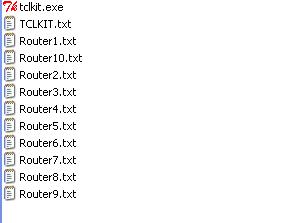
Now its time to auto generate the configs. What this looping script does is take the first line on the data, do the variable substitution and then at the end it will save the text file with the hostname as the filename. It does this until the last line of the data. The files will be auto generated where the TCLKIT software is saved.

Open TCLKIT, two windows will appear big and small. Click on File -> Source ->Go to the directory where you saved the script as text file -> Change "Files of Type to "All Files" -> Select the Script. Then viola, your configurations appear and all variables substituted. It makes life easier for a network engineer.

It is for sure a tedious task but using TCL, it will pretty much make your life easier. I have researched for a way to automate the config preparation provided you have all the necessary data required. I am not a programmer but somehow I managed to find some TCL software and commands to make this possible. Before we begin we would need to have TCLKIT which can be downloaded here.
Now for this example, let us only try to create configs for 10 routers. Our standard config is as shown below. (not so long so make things easier)
hostname (hostname)
!
interface Serial1/1
ip address (ip address)(mask)
!
router ospf 1
network(network) (wildcard) area (ospf area)
The first step is to create our variables, quite much work required for this especially for long standard configs. We will create variables for those with () in the standard config above. These are the parts in the configuration wherein the data will be placed. Standard configuration with variables shown below.
hostname $hostname
!
interface Serial1/1
ip address $ipaddress $ipmask
!
router ospf 1
network $network $wildcard area $ospfarea
Now we have created our variables. Let us use the multivariable "foreach" TCL command to create a looping script. We put in our variables next to the "foreach" statement. The "$" is not required. If you are not familiar with this, please visit this post.
foreach {hostname ipaddress ipmask network wildcard ospfarea}
The next line of this script will now contain the data. Prepare the data in excel spreadsheet and the sequence of the columns should be the same as the one listed in the "foreach" statement. Then add that to the second line of the script. Put an open { before the data and } after the data.
Add also the important commands below that will make auto text file generation for each config file. The final script will look like something below. Then save this as a text file.
foreach {hostname ipaddress ipmask network wildcard ospfarea} {
Router1    1.1.1.1    255.255.255.0    1.1.1.1    0.0.0.0    1
Router2    1.1.1.2    255.255.255.0    1.1.1.2    0.0.0.0    2
Router3    1.1.1.3    255.255.255.0    1.1.1.3    0.0.0.0    3
Router4    1.1.1.4    255.255.255.0    1.1.1.4    0.0.0.0    4
Router5    1.1.1.5    255.255.255.0    1.1.1.5    0.0.0.0    5
Router6    1.1.1.6    255.255.255.0    1.1.1.6    0.0.0.0    6
Router7    1.1.1.7    255.255.255.0    1.1.1.7    0.0.0.0    7
Router8    1.1.1.8    255.255.255.0    1.1.1.8    0.0.0.0    8
Router9    1.1.1.9    255.255.255.0    1.1.1.9    0.0.0.0    9
Router10    1.1.1.10    255.255.255.0    1.1.1.10    0.0.0.0    10

} {set data "

hostname $hostname
!
interface Serial1/1
ip address $ipaddress $ipmask
!
router ospf 1
network $network $wildcard area $ospfarea

"
      set filename "${hostname}.txt"
      set fileId [open $filename "w"]
      puts -nonewline $fileId $data
      close $fileId

}
Now its time to auto generate the configs. What this looping script does is take the first line on the data, do the variable substitution and then at the end it will save the text file with the hostname as the filename. It does this until the last line of the data. The files will be auto generated where the TCLKIT software is saved.

Open TCLKIT, two windows will appear big and small. Click on File -> Source ->Go to the directory where you saved the script as text file -> Change "Files of Type to "All Files" -> Select the Script. Then viola, your configurations appear and all variables substituted. It makes life easier for a network engineer.

Merry Christmas and a Happy New Year to All
It's been a while since I touched any materials and listened to Scott Morris' Audio bootcamp. My current job really demands a lot of my time. After 3 months of inactivity I promised myself that I will bounce back. I only have 11 months left to take the lab so I'll be studying full force when the new year arrives.
Anyways have a Merry Christmas and Happy New Year to be everybody. Let us overcome any hindrances that tries to stop us from getting our dreams fulfilled. Expect new posts coming when the new year comes. Enjoy!
Anyways have a Merry Christmas and Happy New Year to be everybody. Let us overcome any hindrances that tries to stop us from getting our dreams fulfilled. Expect new posts coming when the new year comes. Enjoy!
It's Been A While
Again, its been a while since I posted something here. I miss the technical stuff I was doing and I could say I was 70% ready for the CCIE exam now I am back to mere 1%. I have a lot more things to share and once again I'll try to find time. Whatever happens my dream to be a CCIE still stands. Hope to hear good news from guys reading my posts.
New Job
It's just today that I have posted something here and the reason behind this is that I am moving to Singapore for a new job on first week of September. I have been very busy with employment passes and other things required for the transfer. My new job involves lesser technical job than what I did in Hewlett Packard but its around 50/50 similar to my current job in a bank. 50 percent for technical and 50 percent for network project management. Even though I lost the other half to project management :), its still related as I will be handling network projects specifically MPLS migrations. Will my pursuit for CCIE still continue? The answer is yes. I love the technical stuff and its still useful with my current job position. My studies for now is in a standstill though I have finished all the topics I need a round or two to go through again all of them.
I will be posting here topics from time to time since there are people who requested from me. I never thought there are people interested with my blog. :) I have created a Facebook page for those who view my blog entries and those who like to be my friends. Please join/like I WANT TO BE A CCIE in Facebook. See you there and keep in touch.
I will be posting here topics from time to time since there are people who requested from me. I never thought there are people interested with my blog. :) I have created a Facebook page for those who view my blog entries and those who like to be my friends. Please join/like I WANT TO BE A CCIE in Facebook. See you there and keep in touch.
Answer: Reload Router By Telnet
Configure a default route from R1 pointing to R2's ip address. The challenge is to reboot R1
from a telnet command from R3 without typing the command "reload".  R3 should not telnet
directly to 12.12.12.1 but instead it should telnet 23.23.23.2 port 3000 to get to 12.12.12.1
port 3005. R1 should automatically ask to proceed to reboot and not ask for username/password
once the telnet from R3 is executed.
Solution is pretty simple. First we need to configure NATing on R2 to translate 23.23.23.2 port 3000 to 12.12.12.1 port 3005.
R2#
!
ip nat inside source static tcp 12.12.12.1 3005 23.23.23.2 3000 extendable
!
interface Serial1/3
 ip nat outside
interface Serial1/1
 ip nat inside
Lets also configure telnet password in R2 for testing.
line vty 0 4
password cisco
login
Now we have solved the first problem. There are 3 issues left on R1, how to make telnet not ask for a password, how to use port 3005 for telnet and how to make the reload automatic. Here's how the configuration should look like.
R1#
!
line vty 0 4
privilege level 15
no login
rotary 5
autocommand  reload
Setting the vty to "privilege level 15" and configuring "no login" by passes user authentication. By default if there is no password set the device will refuse connections. "Rotary 5" command lets you use port 2005, 3005, 4005 and so on for telnet. The "autocommand" feature executes whatever command after the telnet.
Let's test first telneting to 23.23.23.2 using default telnet port.
R3#telnet 23.23.23.2
Trying 23.23.23.2 ... Open


User Access Verification

Password:
R2>
We see it doesn't go to R1 but to R2 instead. Now to test using port 3000.
R3#telnet 23.23.23.2 3000
Trying 23.23.23.2, 3000 ... Open


System configuration has been modified. Save? [yes/no]:

Debug on R1
R1#debug ip packet
*Aug 26 15:47:43.299: IP: tableid=0, s=23.23.23.3 (Serial1/2), d=12.12.12.1 (Serial1/2), routed via RIB
*Aug 26 15:47:43.299: IP: s=23.23.23.3 (Serial1/2), d=12.12.12.1 (Serial1/2), len 44, rcvd 3
*Aug 26 15:47:43.307: IP: tableid=0, s=12.12.12.1 (local), d=23.23.23.3 (Serial1/2), routed via FIB
*Aug 26 15:47:43.307: IP: s=12.12.12.1 (local), d=23.23.23.3 (Serial1/2), len 44, sending
The debug clearly shows that the telnet came from R3. The telnet due to NAT redirected the traffic towards 12.12.12.1. Some people call this NAT redirection. Obviously this is not a practical way to reload routers but this is just for fun and to demonstrate how can be used to redirect traffic. I haven't seen any enterprise using this way to reload and will not see in the future. LOLS!
Lab Challenge: Reload Router By Telnet
Here's a little challenge, I thought of this during my train trip when I was going home this evening. This should be pretty easy. Consider the diagram below and the scenario.

I believe this should be pretty easy for everyone. Let me know your thoughts on how to solve this challenge. I will post a blog entry regarding this for the next post. For now I need to get back to the belly of the IOS beast. Cheers!

Configure a default route from R1 pointing to R2's ip address. The challenge is to reboot R1
from a telnet command from R3 without typing the command "reload".  R3 should not telnet
directly to 12.12.12.1 but instead it should telnet 23.23.23.2 port 3000 to get to 12.12.12.1
port 3005. R1 should automatically ask to proceed to reboot and not ask for username/password
once the telnet from R3 is executed.
I believe this should be pretty easy for everyone. Let me know your thoughts on how to solve this challenge. I will post a blog entry regarding this for the next post. For now I need to get back to the belly of the IOS beast. Cheers!
Broadcast/Network Ping
If there is a need to ping several devices in one same subnet and broadcast domain, you can do several commands or ping like the one below.
You can also do a single ping command to check if all links in the routers are up or not. You can the following below. This works on all kinds of WAN interfaces connected to the router.
This command can be helpful during the CCIE lab exam to verify if interfaces are working. I assume that all who read this already knew this from their CCNA studies but I guess there are exceptions. Even the smartest Cisco Engineers forget basic commands sometimes. Let me know if you are one of those who didn't know this one.

R1#ping 10.1.1.255

Type escape sequence to abort.
Sending 5, 100-byte ICMP Echos to 10.1.1.255, timeout is 2 seconds:

Reply to request 0 from 10.1.1.2, 80 ms
Reply to request 0 from 10.1.1.3, 80 ms
Reply to request 0 from 10.1.1.4, 80 ms
Reply to request 1 from 10.1.1.4, 52 ms
Reply to request 1 from 10.1.1.2, 52 ms
Reply to request 1 from 10.1.1.3, 52 ms
Reply to request 2 from 10.1.1.3, 84 ms
Reply to request 2 from 10.1.1.4, 84 ms
Reply to request 2 from 10.1.1.2, 84 ms
Reply to request 3 from 10.1.1.2, 20 ms
Reply to request 3 from 10.1.1.4, 20 ms
Reply to request 3 from 10.1.1.3, 20 ms
Reply to request 4 from 10.1.1.3, 16 ms
Reply to request 4 from 10.1.1.4, 16 ms
Reply to request 4 from 10.1.1.2, 16 ms

You can also use the Network Address.

R1#ping 10.1.1.0

Type escape sequence to abort.
Sending 5, 100-byte ICMP Echos to 10.1.1.0, timeout is 2 seconds:

Reply to request 0 from 10.1.1.4, 84 ms
Reply to request 0 from 10.1.1.2, 112 ms
Reply to request 0 from 10.1.1.3, 84 ms
Reply to request 1 from 10.1.1.2, 72 ms
Reply to request 1 from 10.1.1.3, 72 ms
Reply to request 1 from 10.1.1.4, 72 ms
Reply to request 2 from 10.1.1.4, 68 ms
Reply to request 2 from 10.1.1.2, 68 ms
Reply to request 2 from 10.1.1.3, 68 ms
Reply to request 3 from 10.1.1.3, 64 ms
Reply to request 3 from 10.1.1.4, 64 ms
Reply to request 3 from 10.1.1.2, 64 ms
Reply to request 4 from 10.1.1.4, 72 ms
Reply to request 4 from 10.1.1.3, 72 ms
Reply to request 4 from 10.1.1.2, 72 ms
You can also do a single ping command to check if all links in the routers are up or not. You can the following below. This works on all kinds of WAN interfaces connected to the router.
R1#ping 255.255.255.255 rep 1

Type escape sequence to abort.
Sending 1, 100-byte ICMP Echos to 255.255.255.255, timeout is 2 seconds:

Reply to request 0 from 15.15.15.5, 16 ms
Reply to request 0 from 10.1.1.4, 16 ms
Reply to request 0 from 10.1.1.3, 16 ms
Reply to request 0 from 10.1.1.2, 16 ms
This command can be helpful during the CCIE lab exam to verify if interfaces are working. I assume that all who read this already knew this from their CCNA studies but I guess there are exceptions. Even the smartest Cisco Engineers forget basic commands sometimes. Let me know if you are one of those who didn't know this one.
Free Troubleshooting Lab
If you want to check out Narbik's troubleshooting workbook and want to get an idea of it, you can visit Dan's blog. This contains around 12 trouble tickets and 1 full TS lab challenge consisting of 10 trouble tickets. Good news is that these are Dynamips ready for those who don't have a real home labs.
If I am not mistaken, Dan is Narbik's partner in creating the Micronics Troubleshooting Workbooks. You can also find a free Narbik troubleshooting workbook in this link. Go check it out and have some fun!
If I am not mistaken, Dan is Narbik's partner in creating the Micronics Troubleshooting Workbooks. You can also find a free Narbik troubleshooting workbook in this link. Go check it out and have some fun!
Flag Counter
I have added a flag counter. I haven't realize I need to track from which countries readers are coming from. It's only after I got 25,000 visits based on the counter below the blog, I realized this. Thanks for the people who are visiting this blog.
If you have any topics you wish to request, please do. Despite of my busy schedules for work and study, I'll find time to blog the request.
If you have any topics you wish to request, please do. Despite of my busy schedules for work and study, I'll find time to blog the request.
Certifications

Blogs that I Read
-
-
-
-
IPv6 radius accounting is still a mess - Since the beginning of putting IPv6 into production BRAS/BNG (almost 3 years ago), we were facing the following issue: radius accounting records were missi...12 years ago
-
Internetwork Expert Volume IV (Troubleshooting) Workbook Review: Part 3 - Once you get the initial configurations loaded you’re ready to begin the lab. This is when the “fun” begins. Those of us who are used to starting labs wi...16 years ago
-
-
Cavani Authorize Central Approached Atletico Madrid Squad - Atletico Madrid Squad – PSG striker Edinson Cavani, incredulously, if he is a similar player Luis Suarez, though they are both from Uruguay. CAVANI will be...9 years ago
-
Network Engineer Jobs - So you want to work for Google as Network Engineer? Check out one of the job ads here. I pasted the screenshot below just in case the ad is removed once...8 years ago
-
Interested in Microsoft Azure? Tune into James Rudley’s Newest Course - Get ready to explore the different methods of automating technical and business challenges with Azure in James Rudley’s new course; Automation With Microso...7 years ago
-
Worth Reading: LLM Prompts for Network Engineers - Tony Mattke put together a long list of recommendations that might help you get more out of your LLM tokens. Definitely worth reading instead of yelling ...20 hours ago
-
Clearing the fog around open switching terminology - The networking industry is making a decisive move toward open switches. Much of the media's attention is on mega-scale operators' do-it-yourself switche...11 years ago
-
-
A Short Summary of Planes - A Short Summary of Planes (the network kind) When the CCDE program was first developed, Cisco conveniently broke down the included technologies into five...7 years ago
-
Book Review: Model-Driven DevOps - Earlier this month at Cisco Live in Las Vegas, I attended a presentation by Steven Carter and Jason King titled *Model-Driven DevOps: The Enterprise Auto...3 years ago
-
Data Center Study - Notes 01 - - reverse proxy caching - the user of loadbalancers for server health monitoring - the need for jumbo frames - the need for NIC features such as interrupt co...12 years ago
-
-
I’m Back - Well hello blog world. Yes it’s been a while since I last posted an update. I meant to update sooner but because I haven’t logged on to WordPress in such a...13 years ago
-
Integrating the Nexus 1000v VSM with vCenter - This is a follow-up to my previous post regarding the Nexus 1000v. Now that I help set the stage for what the Nexus 1000v really is, we can start looking a...17 years ago
-


Subscribe



 Posts
All Comments
Posts
All Comments